

This tool is a professional-grade controller that automates advanced risk management and step-trailing (partial close) on MT4.
With intuitive operations, it strongly supports your discretionary trading to maximize profits and minimize losses.
Right-click on the chart > Select ‘Expert Advisors’ > ‘Properties’. Check ‘Allow DLL imports’ under the ‘Common’ tab. 2. Allow WebRequest for listed URL
From the top menu of MT4, go to ‘Tools’ > ‘Options’ > ‘Expert Advisors’ tab. Check the box for ‘Allow WebRequest for listed URL’, and add
https://richi-ai.net/ to the list.
⚙️ 1. MT4 Parameter Settings (Inputs)
These are the settings to configure when attaching the tool to your MT4 chart.
- Magic Number Set a unique number to avoid conflicts with other EAs. Leaving it as the default value is usually fine.
- UI Theme Choose your favorite design from 8 different themes, including Dark, Light, and Gold.
- Order Tab Bottom Display [NEW!] Select whether to display the ‘Pending Order Panel’ or the ‘Position Info & Profit Panel’ in the lower half of the Order tab. Switch it according to your trading style.
🖱️ 2. Basic Operations (Move & Language Switch)
- Moving the Panel (Drag & Drop) Click and hold the gray header at the top of the controller to drag and freely move it anywhere on the chart.
- Language Switch Button (JP / EN) Click the small button in the top right corner (next to the SP display) to instantly switch between Japanese and English. It displays the target language (e.g., clicking ‘EN’ switches the UI to English) for intuitive operation.
🛒 3. Order Panel (Order Tab)
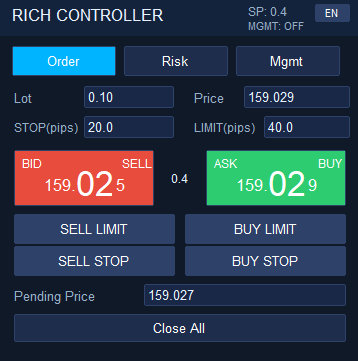
Execute market orders, pending orders, and partial closes instantly with a single click while watching real-time prices.
-
Large Market Buttons (Market BUY & SELL)
Displays the real-time BID/ASK prices fluctuating in milliseconds.
It automatically detects the digits of each instrument and highlights the last two digits that fluctuate the most, allowing you to intuitively grasp the price momentum.
The small badge in the center shows the current spread. - Position Info & Profit Panel [NEW!] If enabled in the parameter settings, the current Lot size, price movement (Pips/$), and profit/loss amount for BUY/SELL positions are displayed in real-time. Decimals are automatically hidden for JPY accounts to improve readability.
- Profit/Loss Hide (Toggle) Feature [NEW!] Click the ‘Profit [v]’ button in the position info panel to mask the profit/loss amount as `***`. This is extremely useful for preventing emotional trading due to price fluctuations or when sharing your screen during live streams.
- Manual Partial Close [NEW!] Specify a percentage (e.g., 50.0%) and click the ‘Part.BUY’ or ‘Part.SELL’ button to instantly take partial profits for the positions in that direction with a single click.
- Close All Instantly close all open positions and cancel all pending orders entered using this tool.
🛡️ 4. Risk Management Panel (Risk Tab)
Calculate the optimal lot size and stop-loss position based on your account balance, risk tolerance, daily volatility, or chart lines.
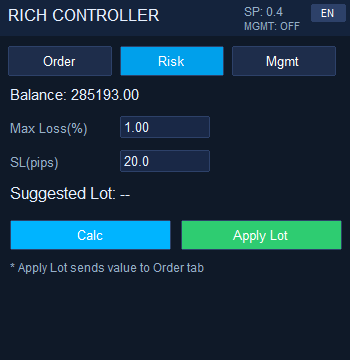
- Max Loss (%) Enter the maximum acceptable loss for a single trade as a percentage of your total account balance.
-
▼ Auto SL Mode [NEW!]
Two powerful new modes have been added to automatically calculate a safe stop-loss (SL) according to market conditions. Check the box to enable them.
① [v] High/Low SL
Based on the highest and lowest prices over a specified period (e.g., 24 bars), it automatically calculates a safe SL value in real-time by adding your specified buffer (+◯ pips/vol).② [v] Line Sync SL*Uncheck both to use the traditional manual input mode.
Checking this will spawn a red dashed line (Auto SL Line) on the chart. Simply move this line with your mouse, and the distance from the current price will be automatically calculated and instantly reflected in the SL field. The ultimate tool for setting SL visually. - Daily Volatility and SL Reference [NEW!] Automatically calculates and displays the previous day’s daily volatility (14-day ATR). It also suggests 20% to 30% of that range as a safe stop-loss reference for day trading, helping beginners set SL without hesitation.
- Calc & Apply Lot Click ‘Calc’ to automatically calculate a safe suggested lot size based on your specified loss % and SL width. Click ‘Apply Lot’ to send that value directly to the Order tab.
📈 5. Management Panel (Step Trailing & Partial Close)
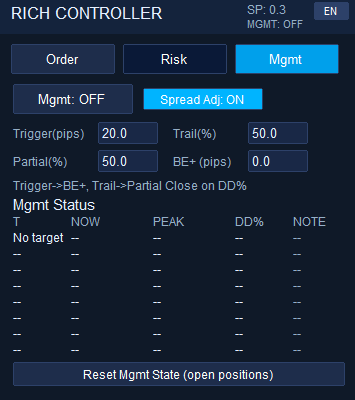
The most important feature of this tool. It is equipped with professional-grade closing logic that secures profits while continuously extracting gains as long as the trend extends.
📊 2×2 Grid Settings
- Trigger (pips / $) Automatic management (trailing) starts the moment your profit reaches the value specified here.
- Trail (%) Monitors how much the price has fallen from the recorded maximum profit (PEAK), and triggers a close the moment it drops by the specified percentage.
-
Partial Close (%)
Sets what percentage of your held lots to take profit on when a close is triggered.
(Example: If holding 1.0 Lot with a 50% setting -> Takes profit on 0.5 Lot, and resumes trailing to aim for a new peak with the remaining 0.5 Lot. Reaching the minimum lot size or a 100% setting results in a full close.) - BE+ (pips / $) When the Trigger is reached, this feature automatically moves the stop-loss line to the ‘Entry Price + ◯’ position once, creating a risk-free (free ride) trade.
💡 Professional Utility Features
- Always-On Tracking (Peak & DD% Monitoring) [NEW!] Even when ‘Mgmt’ is OFF, the system continuously monitors and displays the highest profit (PEAK) and the drawdown percentage (DD%) in the background. It serves as a powerful indicator for manual trading to judge when to turn the management ON.
- Spread Adj: ON/OFF Prevents the situation where a break-even stop results in a slight loss due to spread costs. When ON, it automatically factors the current spread width (plus a 1-pip buffer) into the BE+ position, allowing for an absolutely loss-free (slight profit withdrawal) close.
- Reset Mgmt State (open positions) A ‘reset’ button used when your market perspective changes during discretionary trading. Pressing this erases the tool’s memory of past maximum profits (PEAK) and stop movements, allowing you to restart management using the current rate as the new baseline.
🔍 How to Read the Mgmt Status
The ‘NOTE’ column in the table displays the current status.
– W (Wait): Waiting to hit Trigger
– A (Active): Currently trailing
– W.Peak (Wait Peak): Wait state after partial close until a new peak is formed beating the previous max profit.
🚀 Streamline Your Trading Now
Do you now understand how to configure the RFC (Rich FX Controller) and its powerful closing logic?
Get the tool and attach it to your MT4 right away.
No registration required. Get it for free right now.
Right-click on the chart > Select ‘Expert Advisors’ > ‘Properties’. Check ‘Allow DLL imports’ under the ‘Common’ tab. 2. Allow WebRequest for listed URL
From the top menu of MT4, go to ‘Tools’ > ‘Options’ > ‘Expert Advisors’ tab. Check the box for ‘Allow WebRequest for listed URL’, and add
https://richi-ai.net/ to the list.
Your Super Chats on YouTube keep our development going.
👉 Rich Channel on YouTube
🌻AXIORYで本格トレードを始めるなら今がチャンス!
最新キャンペーンの詳細はコチラから👇👇👇
AXIORYのキャンペーン内容を今すぐチェック!