

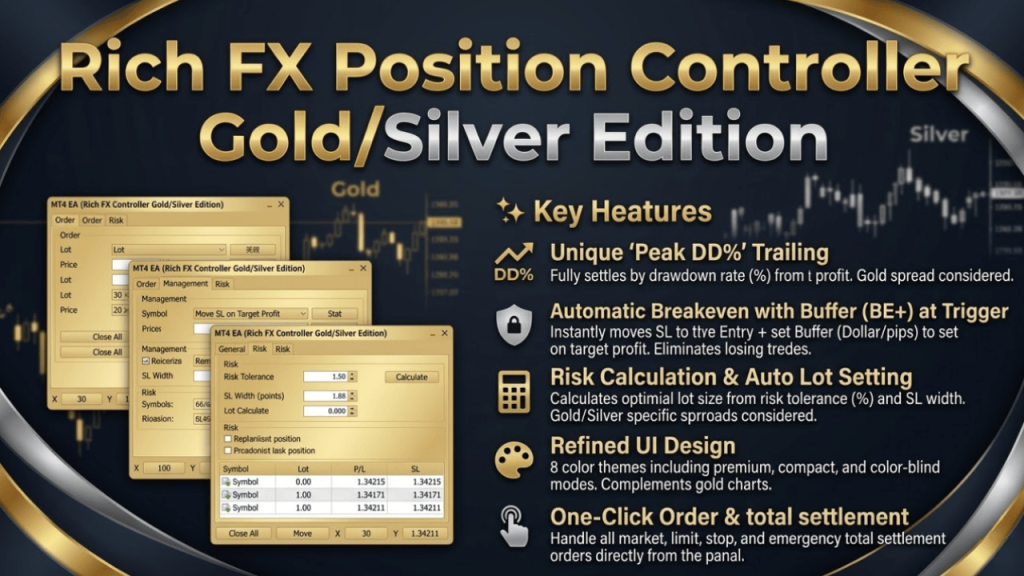
ご購入ありがとうございます。本ツールは、MT4のゴールド・シルバー(Dollarベース)での高度な資金管理とポジション決済を全自動化するプロ仕様のコントローラーです。
Thank you for your purchase. This tool is a professional-grade controller that automates advanced risk management and position closing on MT4 Gold/Silver (Dollar-based).
⚙️ 1. MT4 Parameters / 初期パラメータ設定
MT4のチャートにEAをセットする際に入力する項目です。
These are the settings when attaching the EA to your MT4 chart.
- License Key / ライセンスキー [必須 / Required] 購入時に発行された専用キーを入力してください。 Enter your unique key provided at purchase.
- Magic Number / マジックナンバー 通貨ペア版とは異なる、独自の数字を設定します。 Set a unique number different from the currency pair version.
- Slippage / スリッページ 注文時の許容スリッページ(ポイント)です。 Allowed slippage in points.
- Manage Enable Default / 起動時の管理ON チャート適用時にトレール管理を自動でONにするか選択します(デフォルトOFF推奨)。 Auto-start trailing management upon attachment (Default OFF recommended).
- UI Theme & Language / テーマと表示言語 ダーク、ライト、ゴールドなど8種類のデザインと、表示言語(JP / EN)を選択できます。 Choose from 8 designs and select panel language (JP / EN).
🛒 2. Order Tab / 注文パネル
ワンクリックで成行・指値注文を瞬時に実行します。ゴールド特有のボラティリティに対応。
Execute market and pending orders instantly with one click, designed for Gold’s volatility.
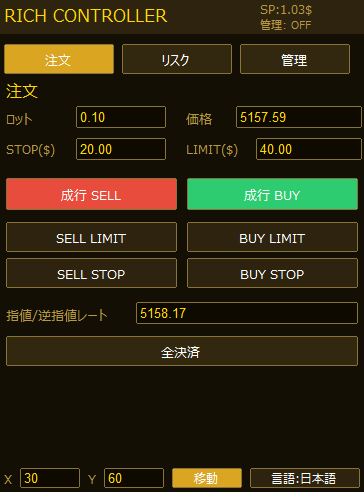
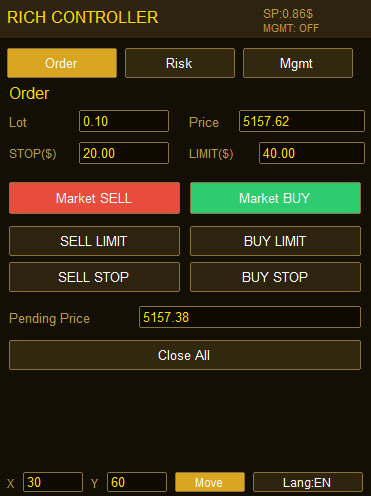
- Lot & Price / ロットと価格 注文するロット数と、現在のレート(手動入力可)が表示されます。 Lot size for the order and current rate (Manual input available).
- STOP & LIMIT (Dollar) 損切り(STOP)と利確(LIMIT)ラインを、現在価格から何Dollar(またはpips)離すか設定します。 Set stop loss and take profit distance in Dollars (or pips) from current price.
- Market BUY & SELL / 成行注文 設定したLotとSTOP/LIMITで即座にエントリーします。 Execute market order instantly with set Lot and STOP/LIMIT.
- LIMIT & STOP (Pending) / 予約注文 「Pending Price (指値/逆指値レート)」に入力した価格で待機注文を出します。 Place a pending order at the price entered in “Pending Price”.
- Close All / 全決済 このEAでエントリーしたすべてのポジションを即座に決済します。 Close all positions opened by this EA instantly.
🛡️ 3. Risk Tab / リスク管理パネル
口座残高と許容リスクから、最適なロット数を自動計算します。ゴールドのスプレッドや手数料を考慮。
Automatically calculate the optimal lot size based on account balance and risk tolerance, considering Gold’s spread and commissions.
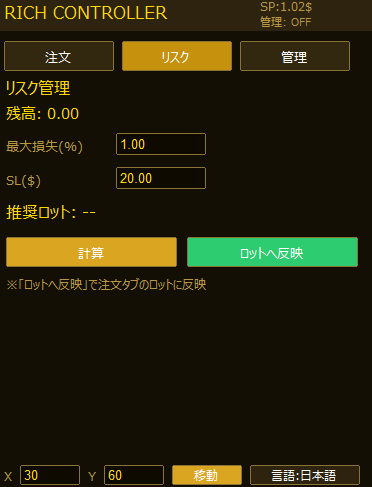
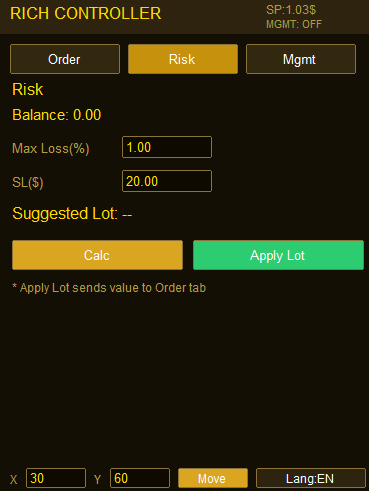
- Max Loss(%) / 最大損失(%) 1回のトレードで許容する損失を資金の何%にするか設定します。 Set the maximum allowed loss per trade as a % of your balance.
- Calc & Apply Lot / 計算と反映 「Calc」で推奨ロット(Suggested Lot)を算出し、「Apply Lot」で注文タブに転送します。 Calculate the “Suggested Lot” and send it directly to the Order tab.
📈 4. Mgmt Tab / 管理パネル(% Trail)
ゴールド特有のボラティリティを活かし、利益を最大化する自動トレール機能です。
Auto-trailing function to maximize profits by leveraging Gold’s unique volatility.
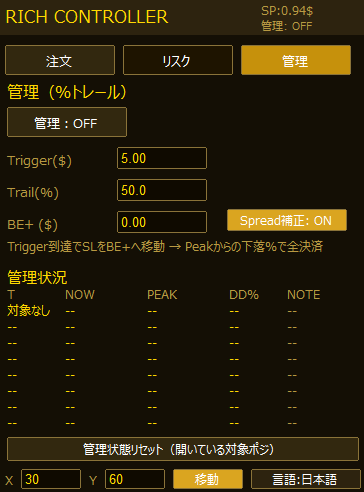
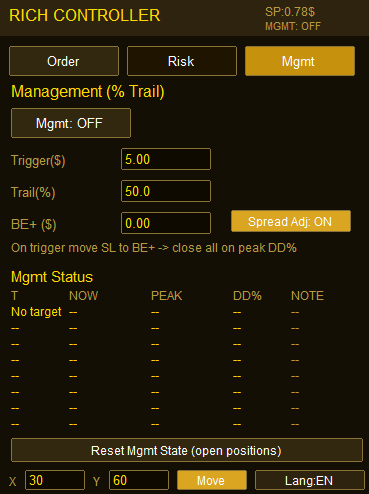
- Mgmt Toggle / 管理ボタン クリックして「ON / ACTIVE」にすると、ポジションの監視が始まります。 Click to “ON / ACTIVE” to start monitoring positions.
- Trigger (Dollar) & Trail (%) 利益が指定したDollarに達すると管理開始。記録した最大利益から「Trail(%)」分下落した瞬間に全決済します。 Management starts at Trigger Dollars. Closes all when profit drops by “Trail(%)” from peak.
- BE+ (Dollar) Trigger到達時、ストップロスを「建値+◯Dollar」の位置へ1度だけ自動移動し、負けを無くします。 Moves Stop Loss to “Entry Price + ◯ Dollars” once Trigger is reached.
- Mgmt Status / 管理状況 監視中のポジションの「現在利益(NOW)」「最大利益(PEAK)」「下落率(DD%)」をリアルタイム表示します。 Real-time display of “NOW”, “PEAK”, and “DD%” for monitored positions.
⚙️ 5. General Controls / その他の操作
パネル下部のメニューで、画面のカスタマイズが可能です。
Customize your screen using the bottom menu.
- X / Y & Move / 移動 パネルの表示位置をピクセル単位で指定し、「Move」で移動させます。 Specify X/Y coordinates and click “Move” to relocate the panel.
- Lang / 言語切替 クリックするたびに日本語と英語が瞬時に切り替わります。 Click to toggle between Japanese and English instantly.
🚀 ゴールド・シルバー版はこちら / Get the Tool
まだツールをお持ちでない方は、Gumroad公式ストアよりすぐにご購入・ダウンロードいただけます。
If you don’t have the tool yet, you can purchase and download it from our official Gumroad store.
🌻AXIORYで本格トレードを始めるなら今がチャンス!
最新キャンペーンの詳細はコチラから👇👇👇
AXIORYのキャンペーン内容を今すぐチェック!